03
Now edit it
The same piece is fully editable: notes, voices, ornaments, dynamics. It's a real editor, not a viewer.
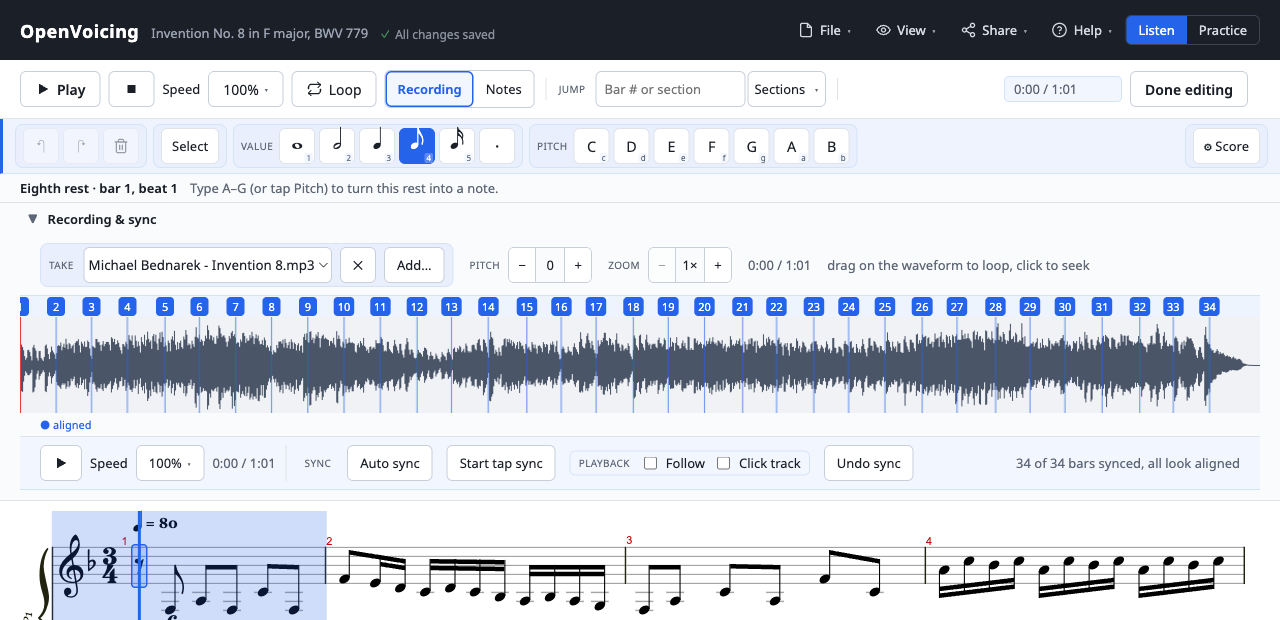
Click a note and type A–G; autosaves as you go.
Open this piece in the editor →
Open-source living sheet music Alpha
OpenVoicing turns a score into something you can practice with and share, built on an open file format you own and can keep. Free and open source.
This is an early alpha. The core is working and genuinely useful, but expect rough edges and changes as it develops.
The player below is a real OpenVoicing embed: Bach's Invention No. 8, the notation synced to a harpsichord recording.
The same piece is fully editable: notes, voices, ornaments, dynamics. It's a real editor, not a viewer.
Every piece is a self-contained .ovb file holding the score, its recordings, and the sync map. You own it, host it anywhere, and the player is just static files. No account, no lock-in.
Slow a passage down without changing pitch, loop it, add a count-in, and follow a metronome. The tools you actually reach for when learning a piece.
How to practice with it →Line a real performance up with the score, bar by bar, so playback follows the notation, and you can loop and slow the real thing. It works with an audio file or a YouTube video (a lesson or a performance), the notation following along as it plays.
Play along with a recording →Import MusicXML or Guitar Pro, edit notes, voices, ornaments, and dynamics, then export a portable bundle that plays the same everywhere, forever.
Import and edit your own music →Embed anywhere
Host a bundle anywhere static, drop in the script, and point a div at it. That's the whole integration. The same player you see above.
<script src="https://your-host/openvoicing-embed.js"></script>
<div data-openvoicing-bundle="https://example.com/tune.ovb"></div>
How to publish and embed →
Static hosting, an open format, an embed SDK.
Publish and embed →MIT licensed. Use it anywhere, including commercially.
How the licensing works →